- New: patch.RenderResolution, on-the-fly change of Render Effects Resolution, dpi
New: patch.AutocenterPowerClipToggle, on-the-fly toggling of "Center new powerclips contents" option
New: patch.NavigatorWindowSize - for X3 & X4, resizes document navigator (50-500, DRAW's default is 150), standard hotkey is "N"
Download test version of the macro
- patch.SlowZoomToggle - toggle mousewheel zoom speed (fast, as in X3 default, or slow, as in Draw11). Shift-scrolling speed is also toggled.
- patch.ZoomLevelLimitToggle - toggle "Maximum (minimum) zoom level achieved reached" messages.
- patch.NodeGlyph2xToggle - toggle double size for nonselected node glyphs in node edit mode. Nodes thus are easier to be seen / work with.
- patch.NodeGlyphColoredToggle - toggle node color coding for different types of nodes.
- patch.SnapRadiusSet - set userspecified value of gravity of snapping (1..35, default is 10). High value (35) makes it a lot easier to work with guidelines and snap-to-objects
- patch.SnapRadiusStd10, SnapRadiusMax35 - 1-click macros to quickly set gravity of snapping to 10 and 35 respectively
- patch.CLOLreadToggle - disable reading of ColorStyles from CDR files to speed-up opening
- patch.CLOLwriteToggle - disable saving of ColorStyles to CDR files to optimize file size to speed-up saving
- patch.CrossHairToggle - fullscreen cross hair mouse pointer
- patch.DispImageAntiAliasToggle - antialiasing of bitmaps in enhanced view mode
- patch.Setup - configure automatic applying of the settings at startup time. Naturally don't forget to clear the "DelayLoadVBA" checkbox in Tools-Options-VBA - thus actually allowing VBA macros to run at startup.
- works with DrawX3sp2 (13.0.0.739)
wx_PatchDraw [updated]


RecentFiles Nov11 - important fix
Nov 11:
- Important fix: skip '..' parent folder on (multiple) file delete.
Today I've just deleted 1.5GB of my very valuable data folder, thanx to file restoring software I immediately got it back :-) - SaveAs invoke mode if form was minimized - fixed: wrong control got focus, now it's file name input field
wx_TOOLS updates: bitmaps, screenscroll, PClipPick
See also: wx_Tools: previous blog post with package description
Fixed: PClipPick bug with screen redraw when no object under mouse
- wx.ZoomOutBack - to replace F3 hotkey, restores old pre-X3 behaviour
- wx.OutlineEqualsFill - makes outline color equal to fill. Useful for trace results in X3 to eliminate faint ghostly 'outline'
- wx.BitmapsDownsample - resamples bitmaps if its dpi is larger than specified by 20%. Asks dpi # and processes selected / whole doc, including powerclips. Shows per page statistics
- wx.BitmapsSetDPI - changes dpi value for bitmaps without resampling. Asks dpi # and processes selected / whole doc, including powerclips. Shows per page statistics.
- wx.BitmapsToPowerclips - puts bitmaps into powerclips. Asks bleed # and processes selected / whole doc. Shows per page statistics.
- wx.ScrollScreenDown, ...Up ...Left ...Right ...DownRight ...UpRight ...DownLeft ...UpLeft - Scroll by 80% of screen. Assign e.g. to Ctrl-Alt-Numpad keys (1 to 9)
VectorChannelMixer for CMYK [updated]
 | Updated to not show multiple selection marks while processing. |

wx_PatchDraw :: NodeGlyphColoredToggle added
 | Added new macro to the wx_PatchDraw package. patch.NodeGlyphColoredToggle - toggle node color coding for different types of nodes. Download |
wx_TOOLS macro package
The package of versatile handy tools I use currently to slipstream my workflow.
- wx.PClipPick - pick a powerclipped shape(s) without entering powerclip editing mode. Works with keyboard assignment only: for example "W" and "Shift-W" (to add to selection). Repeat the macro to pick nested shapes.
- wx.InvertSelection - invert shapes selection
- wx.ZoomOutBack - to replace F3 hotkey, restores old pre-X3 behaviour
- wx.CreateFountain - to quickcreate complex fountain fills - select a few uniformly filled shapes, invoke the macro, pick the target shape which will be painted with a fountain fill consisting of the selected colors.
Updated to preserve angle and space between source swatches - wx.selectComplexCurves - to find shapes with number of nodes greater than specified
- wx.selectSameFillColor, wx.selectSameFillAndOutline, wx.selectSameOutline, wx.selectSameDialog - selects ungroupped shapes with same fill/outline colors. Enable keyboard ScrollLock led to specify sensitivity (negative values allow selection inside groups)
- wx.transparentEdge - create feathered edges for simple shapes (quirky)
- wx.PasteAtMouse - paste the clipboard at mouse position
- wx.ForEach - repeat last standard transform (repeatable usually with Ctrl-R) for the selection of multiple shapes individually for each (each repetition creates its 'undo' record)
- wx.OutlinesToQ_KillEmpty - converts outlines to curves and deletes original shapes if it has no fill
- wx.sizePagetoFIT - resizes page to fit objects + user specified gap
- wx.selectSmallObjects - select objects smaller than user specified threshold
- wx.outlineBehind - enable outline behind. Shift-click to disable
- wx.OutlineIncrease & OutlineDecrease - change selected shapes' outlines width. Each width is changed individually which allows changing of different widths in one selection. I have it on Ctrl-Alt-Up & Down
- wx.OutlineEqualsFill - makes outline color equal to fill. Useful for trace results in X3 to eliminate faint ghostly 'outline'
- wx.GuideHorizontal, GuideVertical - create guide at mouse cursor. Assign to a hotkey
- wx.BlendSplit - splits blend at position under mouse cursor. Invoke via hotkey only
- wx.pageNamesAsNumbers - remove page names ("Page #") so that only numbers remain.
- wx.dupOnNextPage - quick copying of selection to the next page (no clipboard usage). Layers currently are merged.
- wx.TextToCurves - text to curves (also powerclipped) throughout whole document or selection only.
- wx.ConvertShapesToCMYK - converts shapes and bitmaps to CMYK (selected/whole doc)
- wx.BitmapsDownsample - resamples bitmaps if its dpi is larger than specified by 20%. Asks dpi # and processes selected / whole doc, including powerclips. Shows per page statistics
- wx.BitmapsSetDPI - changes dpi value for bitmaps without resampling. Asks dpi # and processes selected / whole doc, including powerclips. Shows per page statistics.
- wx.BitmapsToPowerclips - puts bitmaps into powerclips. Asks bleed # and processes selected / whole doc. Shows per page statistics.
- wx.BitmapsResizer - to change (all/page/selected) bitmaps' dimensions proportionally (or force the values entered, if both X,Y are non-zero), optionally processes powerclipped contents

- wx.ScrollScreenDown, ...Up ...Left ...Right ...DownRight ...UpRight ...DownLeft ...UpLeft - Scroll by 80% of screen. Assign e.g. to Ctrl-Alt-Numpad keys (1 to 9)
Purchase at MacroMonster.com
workspace UI storage cleanup
Test version which helps greatly maintaining large customized UI workspaces.
- You need it when it takes too long to open options's customization list (more than 1-2 seconds) which occures usually after a few months of moderate UI customizing.
- The macro works from inside of Draw as usual gms do, and optimizes UI .xml storage
c:\Documents and Settings\**XPaccount**\
Application Data\Corel\Graphics13\User Workspace\CorelDRAW\
**WorkspaceName**\DRAWUIConfig.xml - Keeps your custom icons, hotkey assignments, customized names for macros
- Removes temporary duplicates of macro definitions which is the real cause of fat XML file.
Usage: run macro, close Draw, backup old XML, rename the optimized file to DRAWUIConfig.xml
Download: wx_UICleanXML
GMStools
I want to facilitate GMS usage and here is the pilot project wx_GMStools.


- load a gms from anywhere by just drag'n'drop and make it available for running/editing in this session only
- load and copy gms to standard Draw gms folder
- rebuild a gms file to reduce its size before distribution. Works better than File->Save and produces files much smaller in case of complex project structure.
- create an empty gms without restarting Draw
- works with DRAW v12/X3/X4
Download: wx_GMStools
RecentFiles--July03 :: import like Draw
July03:

- Importing via RF - mouse click to set X/Y position or
to keep embedded (useful for vector formats) or to force page center - import 'PSInterpreted' :: save user's answer and keep it for all selected
- folder in saveAs mode is remembered for new files just created
- Ghostscript dll path in Options
Jun10:
- PDF, PS, AI, PRN, EPS thumbnails displayed. GhostScript is required for most part
Previous changes:
- May31: PickFolder function
fixed, broken May27 - May29: fmtnum1 syntax error fixed, thx Matthew! (the error occured only if CDRinfo is enabled)
- May27: in SaveAs mode: doubleclick a file in folderpane to save into (overwrite warning displayed)
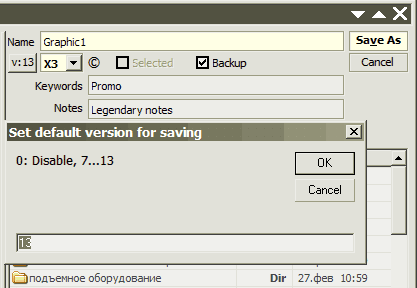
- May16
New folder creation (F7 or rightclick menu)
Default version for saving setup (click v:>>)
Notes/Keywords editing on save (click ©)
Min/Max/Close mouse hiliting - May14
closing by X fixed when in quicksearch editbox.
closing maximized window - size & layout saved correctly now - May10: CorelDRAW 11 compatibility fixed
- May 8: New options:
Button pictures toggle
Icons in folder pane toggling
Coloring of files (cdr/image/folder) toggle
Subscribe to:
Posts (Atom)