Last version of RecentFiles macro (Nov21) was locking bitmap image files (except CPT) being previewed, so external writing to them was prohibited. Nov30 version fixes this.
Download
Showing posts with label RecentFiles. Show all posts
Showing posts with label RecentFiles. Show all posts
RecentFiles Nov21 - show image info + PDF pages
Nov21: 
- preview bitmap images dimensions, dpi, color mode
- PDF mediabox, PDF page count
- changed: import of PDF by doubleclick - MultiPage/Groupped question is shown only if PDF file has actually more than 1 page (number of pages is shown on the 'multipage' button)
RecentFiles Nov11 - important fix
Nov 11:
- Important fix: skip '..' parent folder on (multiple) file delete.
Today I've just deleted 1.5GB of my very valuable data folder, thanx to file restoring software I immediately got it back :-) - SaveAs invoke mode if form was minimized - fixed: wrong control got focus, now it's file name input field
RecentFiles--July03 :: import like Draw
July03:

- Importing via RF - mouse click to set X/Y position or
to keep embedded (useful for vector formats) or to force page center - import 'PSInterpreted' :: save user's answer and keep it for all selected
- folder in saveAs mode is remembered for new files just created
- Ghostscript dll path in Options
Jun10:
- PDF, PS, AI, PRN, EPS thumbnails displayed. GhostScript is required for most part
Previous changes:
- May31: PickFolder function
fixed, broken May27 - May29: fmtnum1 syntax error fixed, thx Matthew! (the error occured only if CDRinfo is enabled)
- May27: in SaveAs mode: doubleclick a file in folderpane to save into (overwrite warning displayed)
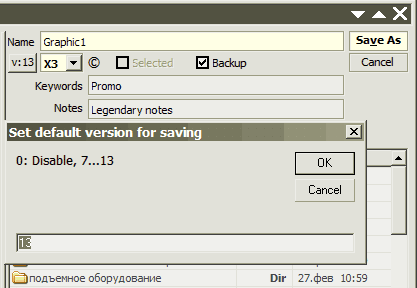
- May16
New folder creation (F7 or rightclick menu)
Default version for saving setup (click v:>>)
Notes/Keywords editing on save (click ©)
Min/Max/Close mouse hiliting - May14
closing by X fixed when in quicksearch editbox.
closing maximized window - size & layout saved correctly now - May10: CorelDRAW 11 compatibility fixed
- May 8: New options:
Button pictures toggle
Icons in folder pane toggling
Coloring of files (cdr/image/folder) toggle
RecentFiles--Mar29
See also full description
- fixed no-show of CDRinfo+ when enabled
- Fixed viewmode change if macro is invoked by AltF1.
- New feature: when launched by keyboard shortcut the macro remembers it so next time you press it INSIDE the macro window the shortcut closes the macro
- macro title now displays current folder name at fixed position so file name is clearly readable (broken in Mar23, fixed in Mar26)
- icons mode - no initial empty space at left of the list. (at last!!!!)
- Caption for long file names is showed again. (broken in Mar23)
- Wrong icon assigned to the history list item (when browsing in folders panel, broken in Mar23).
- New effect on buttons mouse tracking (check it out!)
Download: RecentFiles--Mar29
Thanx Ronny for testing!
Subscribe to:
Posts (Atom)